

Adding a driver to a consortium isn’t the same as clearing them to work. If you’re learning how to add a new driver to a consortium, keep the steps distinct: before a new driver performs safety-sensitive functions, the employer must obtain the driver’s electronic consent for a full FMCSA Clearinghouse query and receive a verified negative pre-employment drug test. Consortium enrollment supports the ongoing random testing program, but it doesn’t replace these pre-employment requirements.
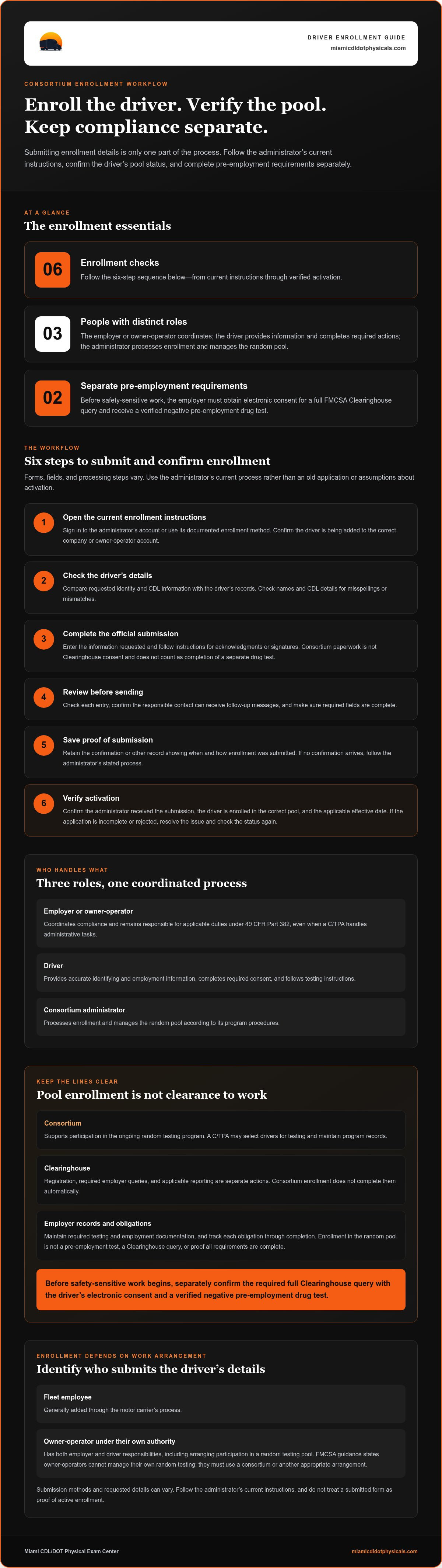
To keep the process on track, separate the tasks by who handles them: the employer or owner-operator coordinates compliance, the driver provides accurate information and completes required actions, and the consortium administrator processes enrollment and manages the random pool. This guide walks through the enrollment workflow, what to verify after submitting details, and how to keep testing and Clearinghouse records separate. Use the checklist to avoid treating a submitted form as proof that enrollment is active or that every requirement is complete.
Key Takeaways
- Follow an ordered workflow for adding a driver, while keeping consortium enrollment separate from other compliance tasks.
- Use the administrator’s current instructions to gather and submit the requested company and driver information.
- Identify who submits enrollment details for an owner-operator, single-driver business, or fleet employee, and who remains responsible for compliance.
- After submission, confirm the driver’s testing-pool status and retain the enrollment record.
- Consortium management can support owner-operators and fleets with enrollment and related administrative steps.
Why adding a new driver to an FMCSA consortium takes more than submitting a form
A consortium is a shared random drug and alcohol testing pool. A consortium/third-party administrator (C/TPA), acting as a service agent, can manage parts of the random testing program, such as selecting drivers for testing and maintaining program records. That support helps organize ongoing testing, but adding a driver to the pool is only one part of the compliance workflow.
Under 49 CFR Part 382, the employer remains responsible for applicable drug and alcohol testing requirements, even when a C/TPA handles administrative tasks. Think of enrollment as a handoff for one function, not a transfer of accountability. If a driver’s details are submitted but pre-employment requirements remain incomplete, pool enrollment alone doesn’t authorize the driver to begin safety-sensitive work.
What consortium enrollment does, and does not, do
Consortium enrollment places an eligible driver in the random testing pool managed for the employer. It supports ongoing random testing; it isn’t a pre-employment drug test, a Clearinghouse query, or proof that all required actions and records are complete.
Before a new driver performs a safety-sensitive function, the employer must complete the required pre-employment drug test and Clearinghouse query. The driver must provide electronic consent for a full query. Track these actions separately from consortium enrollment, and confirm the applicable requirements are complete before work begins.
Who needs to be involved in adding a driver?
The employer or owner-operator coordinates the process and remains accountable for applicable duties. The driver provides accurate identifying and employment information, completes required consent, and follows testing instructions. The consortium administrator processes enrollment and manages the random pool according to its program procedures. Because submission methods and requested details can vary, follow the administrator’s current instructions rather than relying on a form used for another program.
The driver’s work arrangement determines who acts as the employer. A fleet employee is generally added through the motor carrier’s process. An owner-operator operating under their own authority has both employer and driver responsibilities, including arranging participation in a random testing pool. FMCSA guidance states that owner-operators cannot manage their own random testing; they must use a consortium or another appropriate arrangement.
Keep the related obligations distinct:
- Consortium: Supports participation in the ongoing random testing program.
- Clearinghouse: Registration, required employer queries, and applicable reporting are separate actions. Consortium enrollment doesn’t complete them automatically.
- Employer records: Maintain required testing and employment documentation, and track each obligation through completion.
That separation is central to understanding how to add a new driver to a consortium without overlooking the employer’s remaining duties. Confirm enrollment and the driver’s testing-pool status, but don’t treat either as a substitute for pre-employment requirements or other applicable duties under Part 382.
How to Add a New Driver to a Consortium: Enrollment Steps
The practical answer to how to add a new driver to a consortium is to follow the administrator’s current process and verify the result. Forms, required fields, and processing steps differ, so don’t rely on an old application or assume that submitting information activates the driver. Use this sequence to organize enrollment and keep it separate from the employer’s other compliance tasks.
Prepare the company and driver information
Start with the company account or customer identifier, if the administrator uses one, and the responsible contact’s name and current contact details. Gather the driver’s identity and CDL information requested by the administrator. Requirements vary, so use the current instructions to determine which fields apply. Submit information through the administrator’s official channel, and don’t collect or send sensitive details that the process doesn’t require.
- Open the current enrollment instructions. Sign in to the administrator’s account or use its documented enrollment method. Confirm that you’re adding the driver to the correct company or owner-operator account.
- Check the driver’s details. Compare the requested information with the driver’s records. Check names and CDL details carefully to avoid corrections caused by misspellings or mismatched information.
- Complete the official submission. Enter the requested information and follow the form’s directions for acknowledgments or signatures. Consortium paperwork isn’t Clearinghouse consent and doesn’t count as completion of a separate drug test.
- Review before sending. Check each entry, confirm the responsible contact can receive follow-up messages, and make sure required fields are complete.
- Save proof of submission. Retain the confirmation or other record showing when and how you submitted the enrollment. If no confirmation arrives, follow the administrator’s stated process.
- Verify activation. Confirm the administrator received the submission, the driver is enrolled in the correct pool, and the applicable effective date. If the application is incomplete or rejected, resolve the issue and check the status again.
Submit the enrollment and confirm its status
A submitted form is not the same as confirmed enrollment. Keep the administrator’s response with the driver’s compliance records, including any correction request or effective date. If you don’t receive confirmation, follow up through the documented channel. This final check gives the employer a record of the driver’s pool status instead of leaving enrollment unverified.
Keep the enrollment record separate from other required actions. Employers must complete applicable pre-employment testing and Clearinghouse steps before a driver performs safety-sensitive work. For a broader explanation of the rules, consult the FMCSA Drug and Alcohol Rules Overview. Consortium participation supports the random testing program; it doesn’t establish that every other duty is complete.
Owner-operators and fleet companies can use FMCSA Clearinghouse Consortium management for support with driver enrollment. Prepare the requested details, submit them through the current process, and verify the driver’s status and effective date.
Owner-operator or fleet employee: compare the right enrollment workflow
The right process depends on who employs the driver and who administers the testing program. FMCSA rules don’t require every employer to use a consortium: an employer may arrange its own compliant program or use a consortium/third-party administrator (C/TPA). Owner-operators have a different setup because they act as both employer and driver. Use the comparison below to identify who submits enrollment details and who remains responsible for compliance.
| Situation | Who submits enrollment details? | Who remains responsible? |
|---|---|---|
| Owner-operator | The owner-operator arranges enrollment with a C/TPA and provides the required driver and business details. | The owner-operator has employer and driver responsibilities under applicable rules. |
| Single-driver business | The business owner or designated contact submits details if the business uses a consortium. If the owner is also the driver, clarify which account and role the administrator requires. | The employer remains responsible for applicable testing and records, whether it uses a C/TPA or manages its program itself. |
| Fleet employee | A company contact typically submits the employee’s details to the fleet’s administrator or follows the company’s established enrollment process. | The motor carrier remains responsible for applicable employer duties. The driver must provide requested information and complete required actions. |
Adding a fleet employee to an existing company account
For a fleet employee, start with the company’s established testing-program process. The authorized contact submits the driver’s information and checks that it is attached to the correct carrier account. Compare the company identifier and driver details with existing records. A mismatch can leave the driver associated with the wrong account or make enrollment difficult to verify.
Account structures and submission steps differ among administrators. Follow the current instructions for the fleet’s program, then retain the confirmation and verify the driver’s status. The administrator may handle random-pool administration, but the carrier still needs to track its separate obligations and maintain relevant records.
Enrolling an owner-operator in a random testing pool
An owner-operator subject to FMCSA drug and alcohol testing rules has two roles: employer and driver. Under FMCSA requirements, an owner-operator cannot manage their own random testing selection and must participate through a consortium or other appropriate C/TPA arrangement. The owner-operator provides enrollment details as the driver while also ensuring the business’s employer responsibilities are addressed.
Using a C/TPA doesn’t transfer every compliance duty. The owner-operator still needs to handle applicable testing, Clearinghouse, and recordkeeping requirements. FMCSA’s consortium compliance guidance explains available program arrangements and the difference between using a C/TPA and managing an employer program. This distinction helps clarify how to add a new driver to a consortium for a fleet, while recognizing that an owner-operator joins a pool as both employer and driver.
After enrollment: verify testing-pool status, records, and next steps
Once you submit a driver’s details, close the loop. Keep evidence of what was sent, confirm that the administrator processed it, and track the driver’s status separately from pre-employment testing and Clearinghouse tasks. This follow-through helps prevent a submitted request from being mistaken for confirmed enrollment or proof that every other compliance obligation is complete.
What to verify after submitting driver details
Check that the administrator received the request and addressed any missing information. Then confirm that the driver appears in the applicable random testing pool and note the effective date used for the enrollment record. If a detail needs correction, retain the follow-up and verify the updated status rather than relying on an earlier confirmation.
- Submission: Save the enrollment confirmation and related messages or correction requests.
- Pool status: Record confirmation that the driver is included in the correct program or pool.
- Effective date: Note the date supplied by the administrator and keep it with the enrollment record.
- Company file: Store relevant correspondence and status records with the company’s compliance documentation, following applicable recordkeeping requirements.
These records provide a trail showing when the driver was submitted, whether the administrator needed more information, and when enrollment took effect. Limit access to people who need the information to manage the program.
Keep consortium enrollment separate from other compliance tasks
Random-pool enrollment doesn’t complete a Clearinghouse query or reporting action, and it doesn’t establish that pre-employment testing or other applicable requirements are complete. Track each duty in its own record or checklist, and review the DOT drug testing compliance guide for context on testing responsibilities. Separating tasks makes it easier to spot an outstanding requirement instead of treating one confirmation as an all-clear.
Before assigning safety-sensitive work, confirm that the required steps for that driver and situation are complete. Employers should also review current FMCSA guidance, since requirements and agency instructions can change. This overview is educational, not legal advice or a substitute for the regulations that apply to your operation.
For practical support with consortium administration, get support managing FMCSA Clearinghouse Consortium enrollment. Keep the administrator’s confirmation and status details with your records, then continue tracking separate testing and Clearinghouse responsibilities.
Get help adding a driver through the Miami CDL/DOT Physical Exam Center consortium
Adding a driver involves more than sending information. Owner-operators and fleet companies need an organized enrollment process, a way to verify the driver’s status, and a clear record of what has been completed. Miami CDL/DOT Physical Exam Center provides FMCSA Clearinghouse Consortium management to support these administrative steps, while employers remain responsible for their own applicable duties.
How consortium management can support your enrollment workflow
Consortium management can help owner-operators and fleets handle driver enrollment and participation in a random testing pool. A clear process makes it easier to submit requested details, address enrollment questions, and keep confirmation with company records. The center also offers DOT drug testing as part of the broader testing workflow for commercial drivers.
Consortium support doesn’t replace the employer’s applicable compliance duties. Employers remain responsible for separate requirements, including applicable pre-employment testing, Clearinghouse actions, and recordkeeping. Keep these tasks distinct from pool enrollment, and use current FMCSA guidance to understand which requirements apply to your operation and driver.
Take the next step with a clear driver-addition checklist
Before starting, gather the company account details and the driver information requested through the enrollment process. Check names and CDL details for accuracy, then submit them using the administrator’s current instructions. After submission, verify that the request was received and confirm the driver’s enrollment status and applicable effective date. Save the confirmation and relevant messages with your compliance records.
Use this short checklist to keep the process moving:
- Prepare: Have the responsible company contact and requested driver details ready.
- Submit: Follow the current enrollment instructions and review the information before sending.
- Verify: Confirm the driver’s status with the administrator rather than assuming submission means enrollment is active.
- Retain: Keep enrollment confirmation and related communication with company records.
- Track separately: Check off other applicable testing and Clearinghouse duties independently.
These steps offer a practical starting point for how to add a new driver to a consortium, whether you manage a fleet or operate as both employer and driver. Consortium management supports the enrollment workflow, but an enrollment confirmation doesn’t prove that every compliance obligation is complete.
For help with FMCSA Clearinghouse Consortium management, explore consortium support.
Make driver onboarding a repeatable process
Adding a driver is an opportunity to strengthen your onboarding routine. Assign a consistent point of contact, keep enrollment confirmations with the right records, and build in a status check before moving to the next step. A repeatable process helps prevent rushed submissions from creating gaps in compliance tracking.
If you’re still working out how to add a new driver to a consortium, Miami CDL/DOT Physical Exam Center provides FMCSA Clearinghouse Consortium management for owner-operators and fleet companies, alongside DOT and non-DOT drug testing services. Employers retain their own responsibilities, but administrative support can help keep enrollment organized and make follow-through easier.
Explore FMCSA consortium support to get help with your driver-enrollment process.
Frequently Asked Questions
How do I add a driver to an FMCSA drug testing consortium?
Use the consortium administrator’s current enrollment process and add the driver under the correct employer or owner-operator account. Provide the requested details, review them for accuracy, and keep the submission record. Then verify that the driver appears in the appropriate random testing pool. If the driver is moving between carriers, make sure the enrollment reflects the current employment arrangement rather than relying on an earlier pool record.
What information is needed to enroll a new driver in a consortium?
The administrator sets the exact fields, so follow its current instructions. You may need the company account or customer identifier, the responsible contact’s name and current contact details, and the driver’s identifying and CDL information. Check that the driver’s name and CDL details match the records used by the company. Submit only requested information through the administrator’s designated channel.
Can a driver start safety-sensitive work as soon as the consortium form is submitted?
No. Submitting an enrollment form alone doesn’t clear a driver to perform safety-sensitive functions. Before the driver’s first such function, the employer must complete the required pre-employment drug test and obtain a full Clearinghouse query with the driver’s electronic consent. The employer must receive a verified negative test result. Keep those actions separate from random-pool enrollment and confirm all applicable steps are complete before assigning the work.
Does adding a driver to a consortium automatically enroll them in the Clearinghouse?
No. Consortium enrollment and FMCSA Drug and Alcohol Clearinghouse registration are separate processes. CDL drivers and employers must register in the Clearinghouse, and an employer must conduct required queries and reporting separately from random-pool administration. For example, adding a driver to a testing pool doesn’t provide the driver’s electronic consent for a pre-employment query. Track Clearinghouse actions independently and retain records of completed steps.
Does an owner-operator need to join a drug testing consortium?
Owner-operators subject to FMCSA drug and alcohol testing requirements must participate in a random testing pool through a consortium or appropriate third-party administrator. They can’t manage their own random testing selection. Because an owner-operator is both employer and driver, they need to address the duties associated with both roles, including pool participation and applicable employer responsibilities.
Who is responsible for compliance after a driver is added to a consortium?
The employer remains responsible for applicable compliance, even if a consortium/third-party administrator manages parts of the testing program. For example, an administrator may handle random selections while the employer tracks separate Clearinghouse actions and required records. An owner-operator must account for both employer and driver obligations. Define who handles each task and retain evidence that assigned duties were completed.
What should I do if the consortium has not confirmed the new driver’s enrollment?
Follow up through the administrator’s documented channel. Ask whether the submission was received, whether information is missing, and whether the driver’s enrollment is active. Check for an account mismatch or correction request, then provide any needed information and save the related messages. Don’t treat an unconfirmed form as proof of pool participation. Separately confirm that all other requirements are met before safety-sensitive work begins. For support with enrollment, explore FMCSA Clearinghouse Consortium management.


