

If you’re asking, “how do I check my FMCSA Clearinghouse status,” start with the official Clearinghouse website. Your record is there, but understanding what the result means is a separate step.
An unclear or outdated record can raise questions about what to do next. This guide explains how to access your driver account, locate your status, and understand what the result does and doesn’t tell you. You’ll also find practical steps for login problems and concerns about information in your record.
The official portal is the source for your individual record. If you’re an owner-operator or manage a fleet, an FMCSA Clearinghouse Consortium can support ongoing compliance obligations, but it doesn’t replace checking your own status in the portal.
Key Takeaways
- To answer “how do I check my FMCSA Clearinghouse status,” use the official FMCSA Clearinghouse portal to access your individual record.
- Read your status as an outcome associated with your Clearinghouse record, not as a measure of driving skill or medical certification.
- If you can’t access your account, distinguish login or verification problems from concerns about information in your record.
- Use the status shown to identify an appropriate next step, especially if an entry is unexpected or marked prohibited.
- A personal status check doesn’t replace employer queries or other applicable compliance duties.
What Does Your FMCSA Clearinghouse Status Show?
Drivers can access their own records through the official FMCSA Drug and Alcohol Clearinghouse. The status shown is an outcome associated with information in that record. It is not a general rating of your driving skill, a medical certification, or a decision about your overall health.
Definition: The FMCSA Clearinghouse is a federal online database that records information about applicable drug and alcohol program violations for commercial driver’s license and commercial learner’s permit holders. The Federal Motor Carrier Safety Administration (FMCSA) administers it. The system gives authorized users access to relevant compliance information; it is not a complete file of a driver’s employment, driving history, or medical records.
Checking your record is a review, not a correction or resolution. If you spot information you believe is inaccurate, follow the appropriate process for addressing it. If the status requires follow-up, viewing it alone doesn’t complete that step. Use the displayed information to understand what is recorded and identify what to do next.
Who can check a driver's personal Clearinghouse record?
Drivers sign in to review information associated with their own Clearinghouse record. Employers and authorized service agents use separate account roles for their permitted activities, such as querying records for employment-related compliance. Access permissions and query types depend on the user’s role, so an employer’s view and options may differ from what a driver sees. Use your own driver account to review your personal information.
What information is the Clearinghouse designed to contain?
The Clearinghouse focuses on applicable drug and alcohol program violations and related information reported under FMCSA rules. Reporting participants, including employers and medical review officers, submit information relevant to their responsibilities. The database serves this specific compliance purpose; it does not store every detail about a driver’s work or health.
- It can help clarify: whether relevant violation information appears in your Clearinghouse record.
- It does not establish: your driving ability, your full employment background, or the result of a DOT physical exam.
- It does not automatically resolve: a disputed entry or any required follow-up tied to the information shown.
Keep these limits in mind as you review your record. A status tells you about the Clearinghouse record, but you may need to take a separate step if something appears wrong or requires action.
How Do You Check Your FMCSA Clearinghouse Status Online?
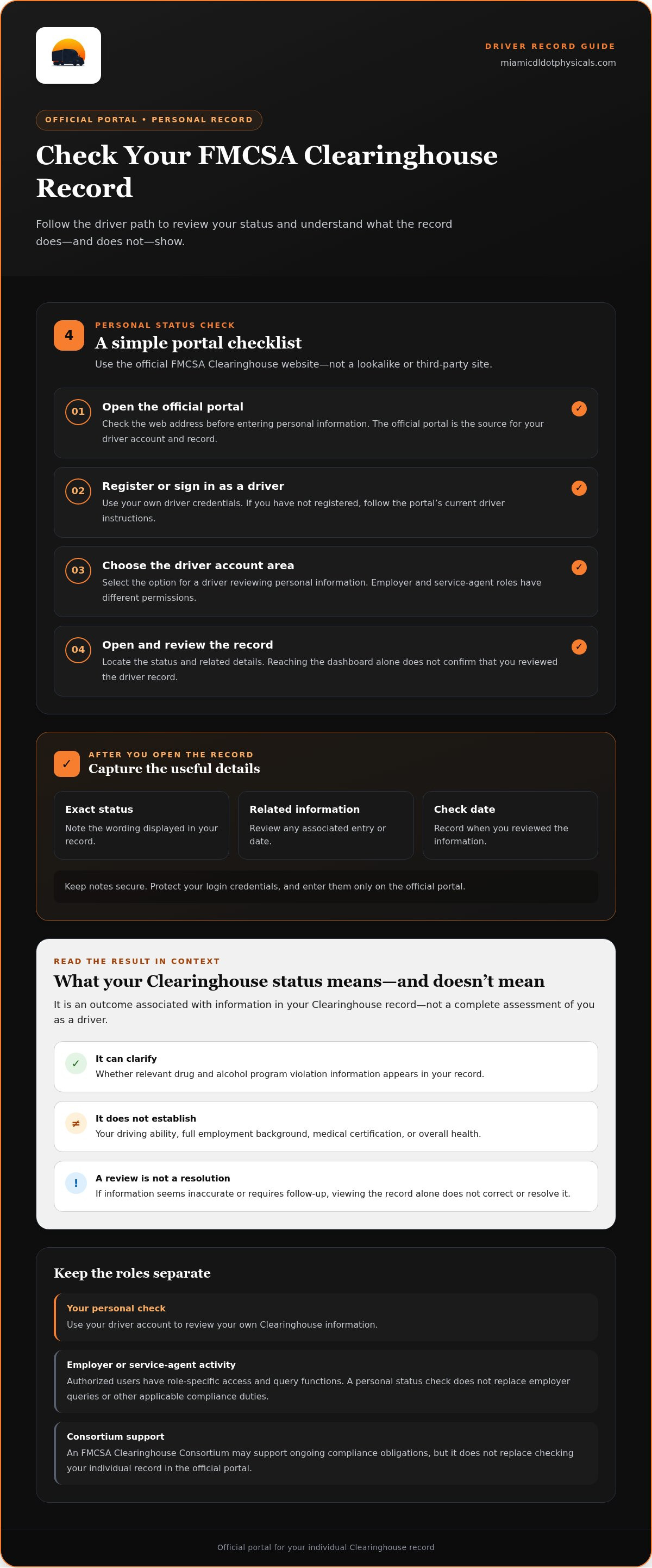
Check your personal record through the official FMCSA Clearinghouse website. Start at the federal portal, not a search result or third-party site that imitates it. The portal is the source for driver account access and Clearinghouse information. Follow this sequence and use the driver-specific instructions displayed there.
- Open the official portal. Go to the official FMCSA Clearinghouse website. Check the web address before entering personal information.
- Register or sign in. If you already have a driver account, sign in with your own credentials. If you haven’t registered, follow the portal’s current instructions for drivers and complete the requested steps.
- Select the driver account area. Choose the option intended for a driver accessing personal information. Don’t select an employer or service-agent role unless you’re acting in that capacity.
- Open and review your record. Locate the status and any related record details. Read the information shown before deciding whether you need to follow up.
Sign in and locate the driver record
The portal serves several user roles, and account options can differ. Drivers access their own information; employers and service agents use role-specific permissions and query functions. Choose the driver path for a personal record check. Registration and identity steps may depend on account role, so follow the current driver instructions rather than assuming guidance for another role applies to you.
Keep your login credentials private. Enter them only on the official portal, and don’t share your password with an employer. If an employer needs to conduct an authorized query, that query uses the applicable portal process, not your personal sign-in details. If you’re unsure which account option fits, consult the portal’s current help information before creating another account.
Review the result and save useful details
After opening your record, note the exact status displayed and review related information, such as an entry or date. Record the date you checked. These notes can help you explain what you saw if you need to address an access problem or raise a concern about the record. Keep them in a secure place, and don’t save sensitive account information in an unsecured file.
Reaching the account dashboard doesn’t necessarily mean you’ve reviewed the record itself. Open the driver record and confirm what it shows. If the page is unavailable, labels have changed, or you can’t tell whether you’re viewing driver information, use the official portal’s current instructions rather than relying on a lookalike site.
Owner-operators and fleets managing ongoing program obligations can use an FMCSA Clearinghouse Consortium for compliance support. Consortium support doesn’t replace using the official portal to check an individual driver record.
What Does 'Prohibited' or 'Not Prohibited' Mean?
A Clearinghouse status summarizes whether information in your record currently bars you from performing safety-sensitive functions under applicable FMCSA drug and alcohol rules. The label is important, but it doesn’t explain every detail behind the result. Review the associated record information too, especially if the result is unexpected. The status alone doesn’t prove that an entry is a clerical error.
| Status label | Meaning and appropriate next action |
|---|---|
| Not prohibited | The record does not show you as currently prohibited from performing safety-sensitive functions. Review any unexpected record details, and continue to meet applicable licensing, medical, employer, and testing requirements. |
| Prohibited | The record indicates you’re barred from performing safety-sensitive functions under applicable rules. Review the associated information and follow current FMCSA instructions for the required next steps, including the return-to-duty process where applicable. |
A status review is not the return-to-duty process. Where required, completing that separate process involves applicable steps and doesn’t mean the displayed status changes instantly.
If the record shows 'not prohibited'
“Not prohibited” indicates that the Clearinghouse does not show you as currently prohibited based on the record. It is not a universal clearance for every aspect of commercial driving. You still need to meet applicable licensing, medical certification, employer, and testing requirements. If an entry or detail looks unfamiliar, review it rather than assuming the status label explains or resolves it.
If the record shows 'prohibited'
A “prohibited” status can affect your commercial driving privileges. Under applicable FMCSA rules, a driver with this status is barred from operating a commercial motor vehicle until the required return-to-duty process is completed. Check current FMCSA instructions for your circumstances, and review the information linked to the status so you understand what it reflects.
The FMCSA Clearinghouse-II rule, effective November 18, 2024, requires state driver licensing agencies to downgrade a CDL for a driver with prohibited status. Take the displayed status seriously and use official instructions to understand what applies to you. Don’t assume that the status will change simply because you’ve reviewed the record or begun seeking help.
If the label conflicts with what you understand about your situation, separate two questions: what status does the portal display, and what information or process explains that status? Note the wording and related record details, then use current FMCSA guidance to identify the appropriate action. Don’t treat the status label alone as proof of an error or as confirmation that every separate driving requirement has been met.
What Should You Do If You Cannot Access Your Status?
If you can’t view your Clearinghouse status, first determine whether the problem is with your account or with information in the record. A sign-in error, missing account, or identity mismatch is an access issue. A status or entry you can see but believe is inaccurate is a record concern. The next steps differ, so don’t treat a login problem as evidence of a record error or start a new registration before reviewing the official instructions.
Use the official FMCSA Clearinghouse website to find current driver instructions, account recovery guidance, and support options. Before trying again, note the message on screen and the step where access stops. Confirm that you selected the driver role and entered your information as requested. Follow the portal’s current process, not instructions intended for employers or service agents.
Troubleshoot login or registration problems
Start with the portal’s account recovery or registration guidance, then confirm you’re using the driver account path and the identity details associated with your account. Review the official instructions for your specific issue before creating another registration. Repeating the process with a different user role may not resolve an access problem and can add confusion.
FMCSA’s identity-verification update effective April 27, 2026, applies to new users registering for specified account roles: employers, C/TPAs, MROs, and SAPs. The stated scope does not include drivers. Follow current portal guidance for your driver account rather than assuming this requirement applies to you.
Respond to information that appears incorrect
If you can sign in but a record detail looks wrong, compare it with your own records and relevant communications. Note the exact entry, dates, and status shown, and keep copies of documents that may help explain the concern. Then follow the Clearinghouse’s current instructions for raising or disputing the record. An employer, clinic, or consortium should not be assumed to have authority to change FMCSA records.
Keep your account secure while seeking clarification. Share relevant documents only through appropriate official channels, and never give another person your password or sign-in credentials. If the portal’s instructions don’t make clear whether you’re facing an access issue or a record dispute, use the official support guidance to identify the correct route.
Owner-operators and fleets can use an FMCSA Clearinghouse Consortium for ongoing program support. Consortium services support compliance obligations, while your individual record remains in the official portal.
After Checking: Maintain Clearinghouse Compliance
Your personal record check is a useful snapshot, not a complete compliance plan. It doesn’t replace employer queries or applicable testing duties. After checking, match your next step to what the record shows, and use official FMCSA guidance for portal questions, record interpretation, and dispute procedures.
- If your record shows not prohibited: Keep meeting applicable licensing, medical, employer, and testing requirements. FMCSA-regulated employers still have their own query responsibilities, including pre-employment and annual queries where required.
- If you see an unexpected entry: Save the relevant details and compare them with your records. Follow the official Clearinghouse process to raise or dispute a concern rather than assuming the entry is an error.
- If your status is prohibited: Review the record and follow current FMCSA instructions for the applicable return-to-duty process. Don’t assume that checking your record or beginning follow-up changes your status.
For a broader explanation of ongoing program obligations, see this FMCSA Clearinghouse consortium guide. A consortium can support eligible owner-operators and fleets with ongoing compliance program needs, but it doesn’t operate the federal database, change its records, or replace checking your own information there.
Choose support based on the issue
Use FMCSA resources for account access, status meaning, and record disputes. Consortium support is relevant when you need help managing an ongoing testing program, not when you need an outside party to alter a Clearinghouse entry. For information about testing responsibilities, the DOT drug testing compliance guide offers related context. Keep testing obligations separate from the steps for reviewing your personal status.
Build a simple record-check routine
Keep useful compliance documents together, such as relevant employer communications, testing paperwork, and notes about a record concern. Review your Clearinghouse information when a work or compliance need makes it appropriate, then note the date and any details that call for follow-up. A saved note helps you return to the right question without relying on memory.
If you need ongoing program or testing support, our center offers an FMCSA Clearinghouse Consortium and DOT drug testing. These services support compliance needs; the FMCSA portal remains the source for your individual record. Explore available compliance services for support with your program and testing needs.
Make Your Next Compliance Step Count
A record check is most useful when it leads to a clear action. Keep compliance documents organized, note questions while they’re fresh, and use official FMCSA guidance for matters involving your account or record. If you’re still asking “how do I check my FMCSA Clearinghouse status,” return to the official portal for your individual information. For ongoing program needs, distinguish personal record access from the support that helps you manage compliance.
Owner-operators and fleets can get support through an FMCSA Clearinghouse Consortium, alongside DOT and non-DOT drug testing. FMCSA-certified medical examinations are also available through our center. These services support compliance needs, while FMCSA remains the authority for Clearinghouse records and requirements.
Explore Clearinghouse consortium and drug testing support to take the next step for your compliance needs.
Frequently Asked Questions
Can a driver check their own FMCSA Clearinghouse status?
Yes. Drivers can access their own information using a personal driver account in the official FMCSA Clearinghouse. Follow the current driver instructions for registration or sign-in. A personal review is separate from an employer’s query, which follows its own requirements. Viewing your record lets you review it; it doesn’t let you edit an entry.
What happens if my FMCSA Clearinghouse status says prohibited?
A prohibited status can affect your commercial driving privileges under applicable FMCSA rules. Review the record details to understand the information associated with the status, then follow current FMCSA instructions for the return-to-duty process that applies to your situation. Don’t assume that contacting an employer or completing one step will change the status immediately. The record and applicable requirements determine what must happen next.
Can an employer see my personal FMCSA Clearinghouse record?
Regulated employers can make Clearinghouse queries for required purposes, subject to applicable query and consent requirements. A pre-employment full query and an annual limited query for current drivers are distinct from your personal review. The query type affects what the employer requests, so don’t assume an employer sees exactly what you see in your driver account. Use current FMCSA guidance for the rules that apply to a particular query.
How long does it take for a Clearinghouse record to update?
There isn’t one guaranteed update period for every record change. Timing can depend on the information being reported and the processing step involved. If you expect a change after a report or completed process, check your record through the official portal and note when you checked. If the expected information still doesn’t appear, consult current FMCSA guidance or portal support rather than relying on an assumed deadline.
Can I dispute information in the FMCSA Clearinghouse?
Yes. If you believe information in your record is inaccurate, use the official FMCSA process for that record concern. Compare the entry with relevant documents, such as a dated communication or testing paperwork, and keep copies for reference. Follow the portal’s current dispute instructions and provide information through the appropriate channel. Our consortium supports program compliance, but it doesn’t change Clearinghouse records.
Does checking my own Clearinghouse status count as an employer query?
No. Your personal review and an employer’s regulated query are separate actions. Sign in to review your own record; employers must follow applicable query procedures for their responsibilities. For example, required pre-employment and annual queries are employer actions, not something a driver completes by opening a personal account. A personal status check doesn’t replace an employer’s compliance duties. Refer to current FMCSA guidance for query rules and terminology.


