

Your DOT medical card is Form MCSA-5876, issued after a DOT physical, but having the card doesn’t confirm that its status appears correctly in your driving record. To learn how to check the status of your DOT medical card online, review your state’s CDL status record. Florida’s online CDL status portal may show whether your medical certification is on file. If it’s missing, a delayed transmission, a record-matching delay, or an expired certificate may explain the gap.
It’s understandable to want clear confirmation, especially when your ability to drive commercially depends on current medical certification. This guide explains what the certificate is, where to check its status online, what to do if it’s missing, and how to track a renewal. Checking your state record after a DOT physical can help you spot a problem and follow up before it disrupts your work.
Key Takeaways
- Use your state’s CDL status portal to see whether your medical certification appears in your driving record.
- If your certification is missing, a transmission or record-matching delay may be involved; knowing what to check can guide your follow-up.
- Track your certificate’s expiration date and allow time for renewal records to appear after submission.
- Learn what the Medical Examiner’s Certificate confirms and how a DOT physical fits into maintaining your certification.
Checking medical certification status in the FMCSA database
There isn’t one federal public lookup for every driver’s medical-card status. If you’re wondering how to check the status of your DOT medical card online, start with your state’s CDL status portal.
CDL and non-CDL drivers may follow different processes. CDL drivers can check their state portal, where available; some states don’t require an in-state-only driver to hold a medical card. Check the process that applies to your state and driving category.
Open your state’s official CDL status tool and follow its prompts. Have your CDL number ready, including leading zeroes. If the portal doesn’t accept it, try entering the number with or without spaces or dashes. Florida’s tool may show license status, CDL class, endorsements, and expiration information. South Carolina CDL customers can check medical-certificate processing status online.
The FMCSA Clearinghouse is not a state medical-certification portal. Registered drivers can view CDL information on the Clearinghouse My Driver Profile page, but that information is verified against CDLIS. It doesn’t confirm whether the state has recorded your medical certification. To check that record, use your state portal.
Tracking Online Certificate Processing and Expiration
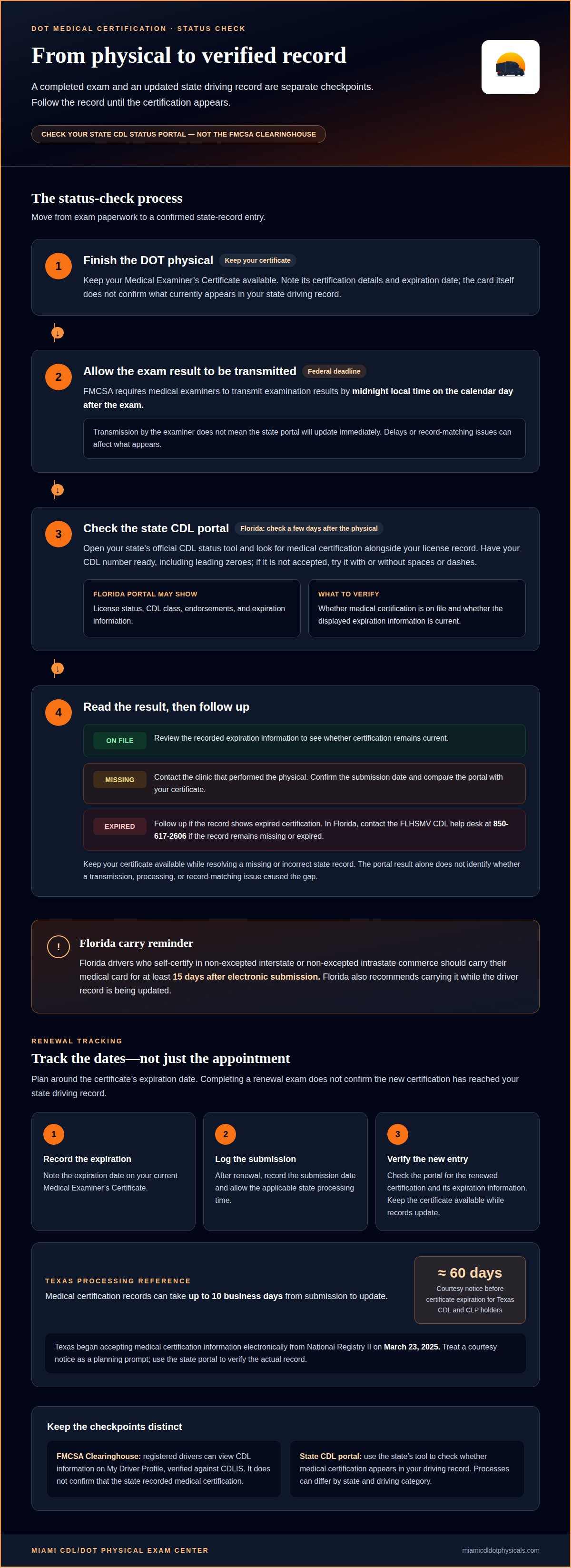
An online processing status shows whether the state record reflects a submitted medical certificate. Expiration information indicates whether the certification remains current. Both matter because a submitted certificate may not appear immediately in your driving record.
In Florida, check the CDL portal after your physical and review the displayed expiration information. According to FMCSA, medical examiners must transmit examination results by midnight local time on the calendar day after the exam. A delay or record-matching issue can still affect what appears in the state portal.
Addressing Missing or Expired Certification
A missing certification means the state record doesn’t show the expected medical information. An expired entry means its recorded validity has ended. Either result calls for follow-up because Florida CDL status can be affected if the certification isn’t corrected.
In Florida, contact the clinic that performed your DOT physical and confirm the submission date. Compare the portal result with your certificate’s expiration date. If the record remains missing or shows expired certification, contact FLHSMV’s CDL help desk at 850-617-2606. Keep your certificate available while resolving the record.
Checking status after a DOT physical
A completed physical and an updated state record are separate checkpoints. Florida drivers are advised to check their CDL status a few days after a DOT physical, allowing time for the medical certification to appear in the state record. The certificate alone doesn’t show what the state portal currently displays.
Use a short follow-up routine after the examination:
- Keep the Medical Examiner’s Certificate available so you can refer to its certification details and expiration date.
- Check your state’s CDL status portal a few days after the physical. Look for medical certification information alongside your license record.
- If the record hasn’t updated, contact the clinic that performed the examination and ask when it submitted your information. Compare that date with the certificate’s expiration date.
Timing matters. According to FMCSA, medical examiners must transmit examination results by midnight local time on the calendar day after the exam. That transmission requirement doesn’t mean a state portal will show the updated record immediately. Florida drivers who self-certify in non-excepted interstate or non-excepted intrastate commerce should carry their medical card for at least 15 days after electronic submission. Florida also recommends carrying it while the driver record is being updated.
An unchanged portal entry doesn’t explain the cause by itself. A transmission problem, processing delay, or record-matching issue can leave the certification absent from the state record. When following up with the clinic, have the physical date and certificate ready. These details can help clarify whether the submission occurred and whether the record reflects the certificate’s validity.
For a future examination, review information about a DOT physical exam as part of planning your certification follow-up.
Medical-card renewal and tracking
Renewal tracking means following your certificate from the medical examination through its appearance in your state driving record. Plan around the expiration date, not just the appointment date. Completing the examination doesn’t confirm that your license record reflects the renewed certification.
Use your state’s status portal to review the record after submission. In Texas, medical certification records can take up to 10 business days from submission to update. Texas CDL and CLP holders also receive a courtesy notification approximately 60 days before their medical examiner certificate expires. Treat that notice as a prompt to plan, then use the portal to check the record itself.
A practical tracking routine keeps the key dates together:
- Note the expiration date shown on your current Medical Examiner’s Certificate.
- After renewal, record the submission date and allow the applicable processing time before checking your state record.
- Review the portal for the new certification and its expiration information. Keep the certificate available while the record updates.
Texas began accepting medical certification information electronically from National Registry II on March 23, 2025. That change makes the state record an important checkpoint after renewal. If the portal still shows an earlier expiration after the stated processing window, contact the clinic that completed the physical and confirm the submission date. Then check your state record again for the updated entry.
Don’t leave an expiration notice unattended. Failing to keep medical certification current can affect a commercial driver’s ability to maintain driving privileges. The Federal Motor Carrier Safety Administration places responsibility for medical certification status on the driver, not the medical examiner or fleet manager. Keep your own dates and portal checks organized, even when someone else handles submission.
What a DOT medical card is
A DOT medical card is the common name for the Medical Examiner’s Certificate, Form MCSA-5876. A medical examiner issues it after a DOT physical when the examination supports certification. The certificate records the medical certification outcome and its expiration information, which helps connect the physical to the driver’s certification record.
The examination focuses on whether a commercial driver can safely operate a motor vehicle. Its purpose includes assessing whether the driver can operate a commercial vehicle safely. That safety assessment is different from a CDL license check: the medical certificate documents the examination result, while the state’s CDL record shows whether certification is on file.
Keep the certificate and state record distinct. A driver may have the MCSA-5876 document after an examination, but still need to confirm that the state record reflects the medical certification. That distinction explains why the physical, certificate, and online status check are separate parts of the process.
Some medical circumstances require additional documentation. For example, drivers with insulin-treated diabetes must submit Form MCSA-5870, the Insulin-Treated Diabetes Mellitus Assessment Form, completed by a treating clinician. This assessment form is not the medical card itself. It is a separate document connected to the certification process for that circumstance.
Medical examiners in the United States must keep a copy of a driver’s Medical Examiner’s Certificate on file for at least 3 years. Drivers should also retain their own certificate details, including the expiration date, so they can follow up if a state portal does not reflect the expected status.
If you need the examination that results in a medical certificate, schedule a DOT physical exam.
Miami CDL/DOT Physical Exam Center
Miami CDL/DOT Physical Exam Center offers professional DOT physical exams and nationwide support for commercial drivers and fleets, including FMCSA Clearinghouse compliance solutions. A successful DOT physical establishes the medical qualification needed for your Medical Examiner’s Certificate. Once your exam is complete, remember to check your state’s CDL record separately to confirm that your new certification has been properly updated and linked to your driver's license.
Understanding the distinction between compliance systems helps drivers know **how to check the status of your DOT medical card online**. The FMCSA Clearinghouse tracks drug and alcohol program compliance rather than functioning as a portal for your medical certificate. Always use your designated state status tool to verify your medical-certification record, and reach out to Miami CDL/DOT Physical Exam Center for nationwide assistance with DOT physicals and comprehensive Clearinghouse support.
Keep Your Certification Records Current
Make certification tracking part of your regular driver paperwork routine. Keep the expiration date and submission details with your records, then check your state portal to confirm the information reflects your current status. This habit gives you a clear next step if a record needs attention, rather than leaving the issue until it affects your work.
Knowing how to check the status of your DOT medical card online is one part of staying organized. Miami CDL/DOT Physical Exam Center offers DOT physical exams, DOT drug tests, and non-DOT drug tests. Choose the service that fits your needs, and keep your records organized alongside any submission follow-up.
For assistance with a DOT physical or drug testing, contact Miami CDL/DOT Physical Exam Center. Keep moving forward with a clear plan for your certification records.
Frequently Asked Questions
What is a DOT medical card?
A DOT medical card is the Medical Examiner’s Certificate, Form MCSA-5876. It documents the result of a commercial driver’s medical examination and includes certification information. Keep the certificate as your personal record, even when your state receives the result electronically. For example, if an employer asks about your medical qualification, the certificate can help you identify the examination outcome and expiration details.
Who is responsible for keeping a driver’s medical certification current?
According to the Federal Motor Carrier Safety Administration, the driver is responsible for keeping medical certification current. A clinic or fleet manager may help with examination or administrative steps, but responsibility for status remains with the driver. Track your certificate’s expiration and follow up on your state record after renewal. This helps you catch an outdated entry before it causes a licensing issue.
How can I check my DOT medical certificate status online through the FMCSA National Registry?
Check your state’s CDL status portal for your individual medical-certification record. Registered drivers can view CDL information through the FMCSA Clearinghouse’s My Driver Profile, but that is not the same as a state medical-certification status record. If you use the National Registry to locate an examiner, remember that an examiner listing doesn’t confirm your certificate appears in your state driving record.
How long does it take for a medical examiner to report a DOT exam to FMCSA or the state DMV?
According to the Federal Motor Carrier Safety Administration, medical examiners must transmit examination results by midnight local time on the calendar day after the exam. A state record may take longer to display the information. For example, Texas drivers should allow up to 10 business days from submission for medical certification records to be fully updated.
How can I find my DOT medical certificate expiration date online?
Look for expiration information in your state’s CDL status portal, if it’s displayed. Florida’s CDL status tool may show expiration information alongside license details. Compare the online entry with the date on your Medical Examiner’s Certificate. If the portal doesn’t display a date, use your certificate as a reference and follow up on any difference between the document and state record.
What should I do if my DOT medical card status is missing or incorrect?
Contact the clinic that performed your physical and confirm when it submitted your certification. Then compare your certificate’s expiration date with the state portal entry. A missing record may reflect a transmission issue, a processing delay, or a mismatch between records. In Florida, drivers can contact the FLHSMV CDL help desk at 850-617-2606 if certification appears missing or expired.


