
Drivers generally don’t have to register in the FMCSA Clearinghouse before driving. FMCSA Clearinghouse account setup for drivers is required to view their own records electronically, while employers must receive a negative full query before a new CDL driver performs safety-sensitive work. The distinction matters: registration and permission to drive are related, but they aren’t the same requirement.
The rules can feel confusing when you’re setting up an account, responding to an employer’s query, or working as an owner-operator. This guide explains who needs to register, what information drivers need, and how to authorize a C/TPA to act for an employer.
You’ll also learn when identity verification applies and what to do if you drive under your own USDOT Number. Follow the steps for your role to complete the right setup and understand what happens next.
Key Takeaways
- Separate driver registration from the employer’s pre-employment query requirement so you know what must happen before safety-sensitive work begins.
- If a limited query returns a positive indicator, the employer must conduct a full query within 24 hours, according to the Federal Motor Carrier Safety Administration.
- Prepare the right account details, identify which roles require identity verification, and follow the setup steps that match your role.
- Owner-operators can learn how employer and driver roles fit together and when an FMCSA Clearinghouse Consortium can help manage compliance tasks.
Must I add drivers to the Clearinghouse before they drive?
Drivers generally don’t need to register before driving, but they must register to view their own Clearinghouse records electronically. Employers must receive a negative full query before a new CDL driver performs safety-sensitive work. CDL and CLP holders follow the same basic driver-account process.
-
Understand Driver Account Eligibility
First, decide whether you need electronic access to your own record or need to respond to an employer’s query. The FMCSA Drug and Alcohol Clearinghouse gives employers and government agencies access to CDL drug and alcohol program violation information. Registration lets you view your record and respond to requests, but it doesn’t, by itself, authorize you to drive.
For FMCSA Clearinghouse account setup for drivers, distinguish account access from an employer’s pre-employment query. A new CDL driver needs a negative full query before performing safety-sensitive work.
-
Choose a Clearinghouse User Role
Next, choose the role that matches your responsibilities. Select Driver if you hold a CDL or CLP and want to access your record or respond to an employer. Don’t select an employer role just because you work for a motor carrier.
An owner-operator driving under their own USDOT Number needs both driver and employer roles. You can register for both at once or add company information after registering as a driver. The roles cover separate personal and business functions.
-
Gather Registration Information
Before starting, create a Login.gov account. Each authorized Clearinghouse user needs unique Login.gov credentials, so don’t share your login with another driver or company user. Keep your current CDL or CLP information handy, since you’ll enter and verify it during driver registration.
If your employer doesn’t have a USDOT Number, request an invitation from its Clearinghouse Administrator. Use the link in the invitation email to begin registration.
-
Register for a Driver Account
Sign in with Login.gov, select the Driver role, and enter your current CDL or CLP details. Complete the prompts, verify your information, and choose your contact preferences. A successful FMCSA Clearinghouse account setup for drivers lets you receive notifications and respond to employer requests electronically.
If a limited query returns a positive indicator, the employer must conduct a full query within 24 hours, according to the Federal Motor Carrier Safety Administration. Respond to any full-query consent request through the Clearinghouse.
Clearinghouse FAQs and user guides
- Check your status by signing in to your driver account and reviewing your record. A reported violation can be associated with your CDL information even if you haven’t registered. CDL and CLP holders with prohibited status lose commercial driving privileges until they complete the return-to-duty process. If you’re unregistered, Clearinghouse notifications are sent by mail to the address associated with your CDL.
- Use the Clearinghouse FAQ and user guides to understand record access, consent, and correction steps. If an entry appears inaccurate, identify the specific information and follow the correction instructions provided through the Clearinghouse. Keep your contact details current so notifications reach you. For employer disclosure, consent must be electronic through the Clearinghouse, according to the Electronic Code of Federal Regulations.
- Keep account access separate from optional assistance. Account setup uses Login.gov and the FMCSA Clearinghouse, while a C/TPA may provide compliance support with an employer’s authorization. Don’t mistake a third party’s service charge for a federal account fee. Review any support arrangement separately from your driver account and its record-access functions.
- Read each query notice before responding. A full query requires your electronic consent before information is released to an employer. If you receive a consent request, sign in to the Clearinghouse, review it, and respond through the system. This ties your decision to the specific employer query rather than an email or phone conversation.
- Use the account FAQs when a login, notification, or record question comes up. For example, an employer may use a limited query for an annual check, while a full query requires your electronic consent. Note the query type and requested action, then follow the matching user-guide instructions instead of treating every notice as the same request.
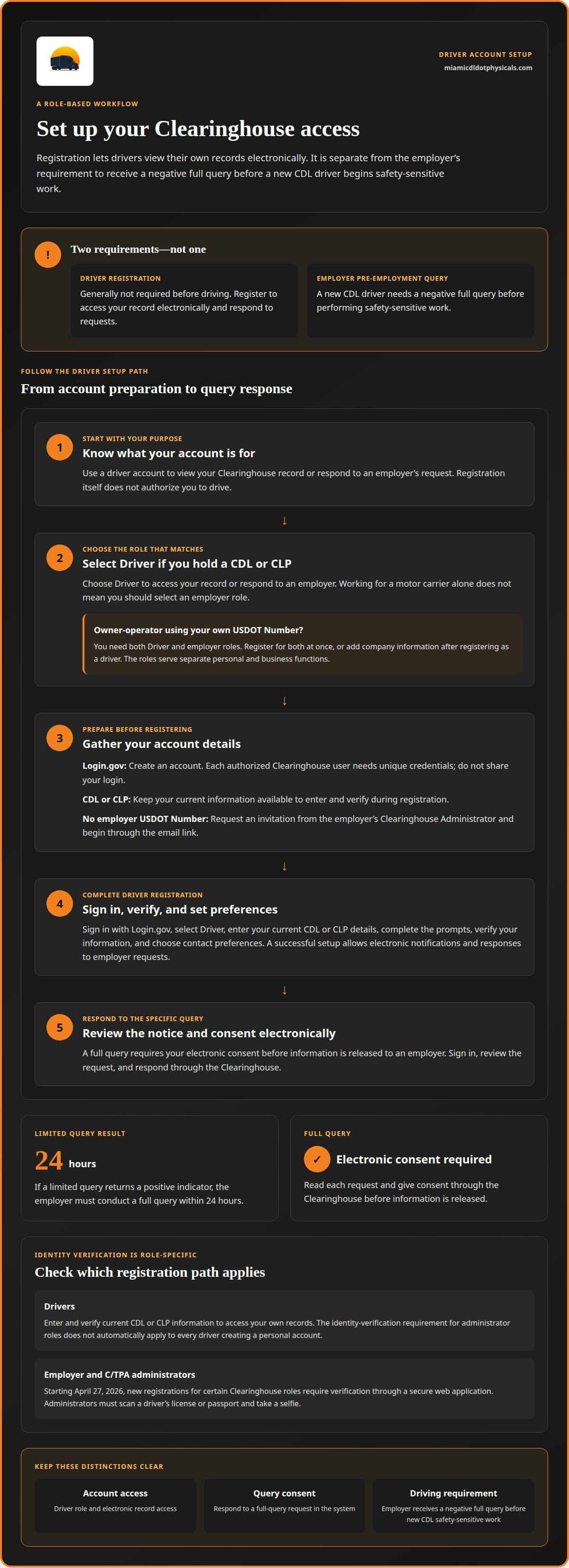
Identity verification for certain user roles
If you can’t access your account or complete identity verification, first determine whether the issue is with Login.gov or the Clearinghouse verification step. Follow the prompts for the affected process, using identification that matches your registration details.
- Check whether your role requires identity verification before beginning registration. Starting April 27, 2026, new registrations for certain FMCSA Drug and Alcohol Clearinghouse roles require verification through a secure web application. This requirement applies to specified roles, not automatically to every driver creating a personal account.
Keep your Driver role separate from an employer or C/TPA administrator role. Drivers enter and verify current CDL or CLP information to view their own records. Employer and C/TPA administrators have a separate identity-verification requirement.
- Prepare an accepted identity document if you’re registering as an employer or C/TPA administrator. Administrators must scan a driver’s license or passport and take a selfie. Follow the secure web application’s prompts to provide both, and make sure the document image and selfie are clear enough for the requested verification.
Don’t assume that entering CDL or CLP details completes administrator verification. License information supports a driver’s record access, while the administrator process requires an identity document and selfie.
- Complete your own account setup rather than sharing credentials. Each authorized Clearinghouse user needs unique Login.gov credentials. For example, a driver and a company administrator must use separate accounts, even if they work for the same motor carrier.
If Login.gov rejects your sign-in, resolve that access issue first. If sign-in works but the verification application can’t confirm your identity, compare your entered details and document images with the application’s prompts before continuing.
- Keep your role and account details consistent if you have multiple responsibilities. An owner-operator may need driver and employer roles, but each authorized user still needs unique Login.gov credentials. Complete the identity steps for the applicable administrator role rather than assuming driver registration covers them.
If an identity check remains incomplete, don’t treat the account as verified. Return to the secure web application and follow the displayed steps for your selected role.
What is the FMCSA Drug and Alcohol Clearinghouse and who needs a driver account?
- Use the Clearinghouse as the federal record system for CDL drug and alcohol program violations. It gives employers and government agencies real-time access to this information. A driver account serves a different purpose: it lets you view your own record electronically and respond to requests concerning it.
Keep these functions distinct. Employers use their roles to conduct queries and meet program responsibilities; drivers use theirs to access personal information. A driver’s record can be associated with CDL information before the driver registers, so registration affects access, not whether a record can exist.
- Decide whether you need an individual driver account based on your driving role. CDL and CLP holders can register to view their records and respond electronically to employer requests. A student driver employed by a motor carrier should also register as a driver, including while training.
Don’t assume registration is always required before driving. You need an account for electronic access and consent actions, while employers handle the required queries. This distinction explains why an employer may send a query request to a new driver before their first safety-sensitive assignment.
- Match additional account roles to your responsibilities. An owner-operator driving under their own USDOT Number needs both driver and employer roles. A motor-carrier owner-operator must also designate a C/TPA in the Clearinghouse. These company duties are separate from viewing a personal driver record.
Employers query each CDL driver in their fleet at least once every 12 months. A limited query for an annual check does not require driver consent; a full query does require electronic consent. Knowing the query type helps you respond appropriately when a request appears.
- Use your contact preferences to keep up with account activity. Registered drivers receive notifications through their chosen method, mail or email. If you remain unregistered, Clearinghouse notifications are sent by mail to the address associated with your CDL.
Review your record and contact details when you sign in. This helps you recognize an employer query, understand the requested action, and keep electronic communication tied to the correct driver account.
Miami CDL/DOT Physical Exam Center: DOT Physical Exam
Commercial drivers nationwide require a medical examination, and Miami CDL/DOT Physical Exam Center provides professional DOT Physical Exams to meet this need. Its FMCSA Clearinghouse Consortium supports owner-operators and fleet companies everywhere with essential Clearinghouse compliance responsibilities. These services address different needs: a physical exam concerns the driver’s medical examination, while a consortium supports overall Clearinghouse compliance.
Choose the service that matches your next task. If you need a DOT Physical Exam, the center provides the required medical examination. If you’re managing Clearinghouse duties as an owner-operator or fleet, its consortium is the relevant service for your operation. Separating these steps helps you focus on the right requirement without confusing account access with a medical exam.
Contact Miami CDL/DOT Physical Exam Center to discuss the service that fits your specific needs.
Keep your compliance steps moving
Treat your completed FMCSA Clearinghouse account setup for drivers as the start of a practical routine, not a task to forget after registration. Review account notices, keep access to your own Login.gov credentials, and distinguish online Clearinghouse actions from medical and testing appointments. Staying organized helps you direct each requirement to the right place and avoid expecting an account to handle tasks outside the portal.
For a medical examination or testing need, Miami CDL/DOT Physical Exam Center offers a DOT Physical Exam, DOT Drug Test, and Non-DOT Drug Test. Each addresses a different need from Clearinghouse account access. Choose the service that fits your next step, then contact Miami CDL/DOT Physical Exam Center to move forward.
Consistent follow-through makes the administrative side of commercial driving easier to manage. Take the next step that fits your situation and keep moving forward with confidence.
Frequently Asked Questions
Need more information about the Clearinghouse?
Use the Clearinghouse FAQ or user guide that matches your task: viewing a driver record, responding to an employer query, or managing C/TPA access. If you have trouble with company permissions or an invitation, contact that organization’s Clearinghouse Administrator. A driver account doesn’t provide employer permissions. For a query notice, determine whether it requests your electronic consent, then follow the corresponding account prompt.
How do drivers create an FMCSA Clearinghouse account step by step?
Create your own Login.gov account, then begin Clearinghouse registration and select the Driver role. Enter and verify your current CDL or CLP information, complete the prompts, and choose your contact preferences. If you’re an owner-operator using your own USDOT Number, add the employer role during setup or enter company information afterward. If your employer has no USDOT Number, start with an invitation from its Clearinghouse Administrator.
What information and documents are needed to register for a Clearinghouse account?
For a driver account, have your current CDL or CLP details and individual Login.gov credentials ready. Enter your license information accurately so it can be verified against your record. Employer and C/TPA administrators have an additional identity check: they must scan a driver’s license or passport and take a selfie through a secure web application. These administrator requirements are separate from driver registration.
How do drivers verify their identity through Login.gov to access the Clearinghouse?
Sign in with your own Login.gov credentials, then follow the Clearinghouse prompts for your selected role. Login.gov provides account access; it isn’t the same as the separate identity verification required for certain employer and C/TPA administrators. For a driver account, enter and verify current CDL or CLP information. If access fails, determine whether the problem is sign-in or role-specific verification before trying again.


